What do an SAP go-live, product development and a factory acceptance test have in common?
They succeed when everyone does the right thing at the right moment.
Many people, a fixed time window, nothing may be forgotten. CaRD Plan turns this into one plan everyone works through live – from the phone, every step documented.
- Several teams at once, live
- Phone, tablet and desktop
- Hosted by CaRD or in your cloud

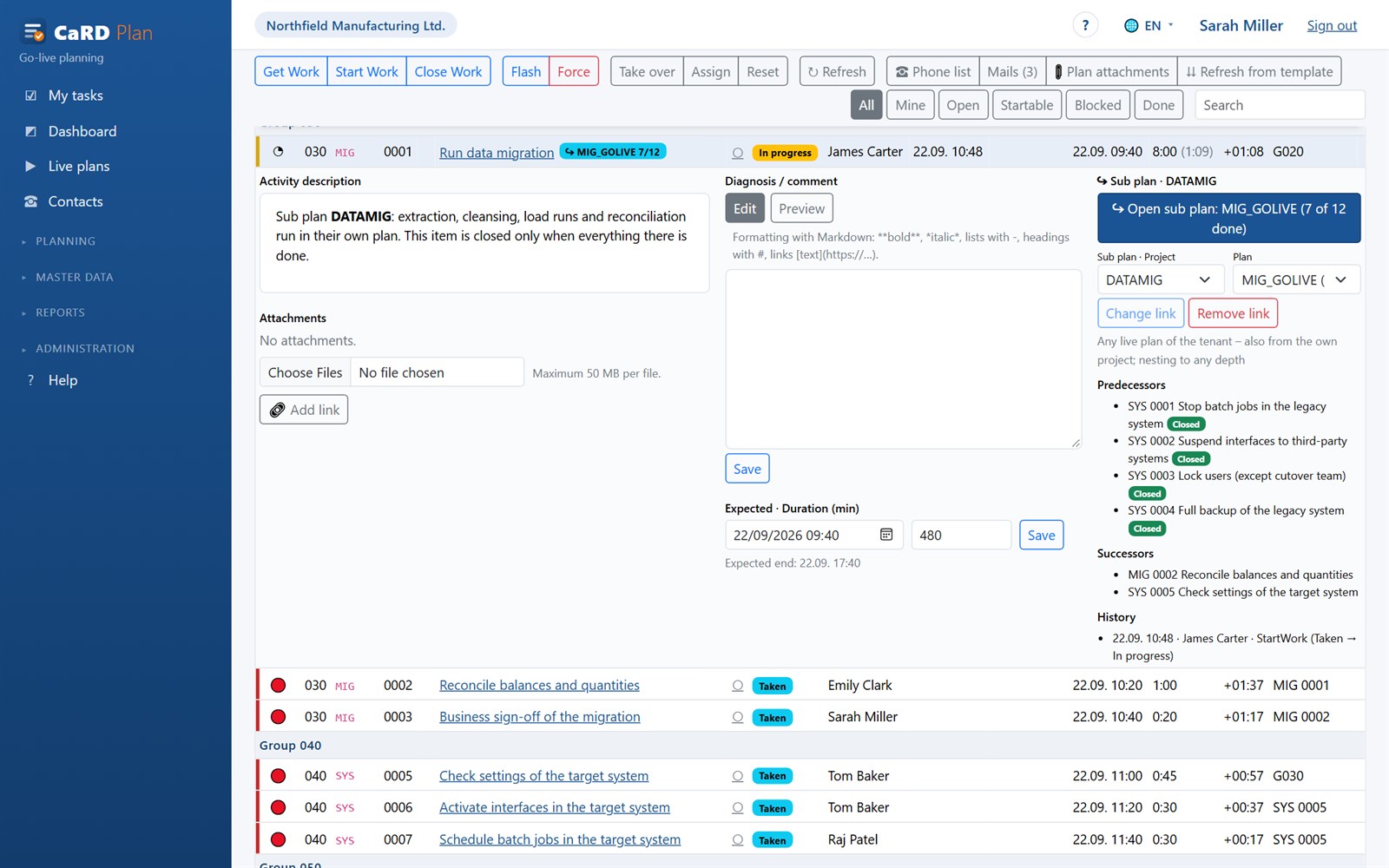
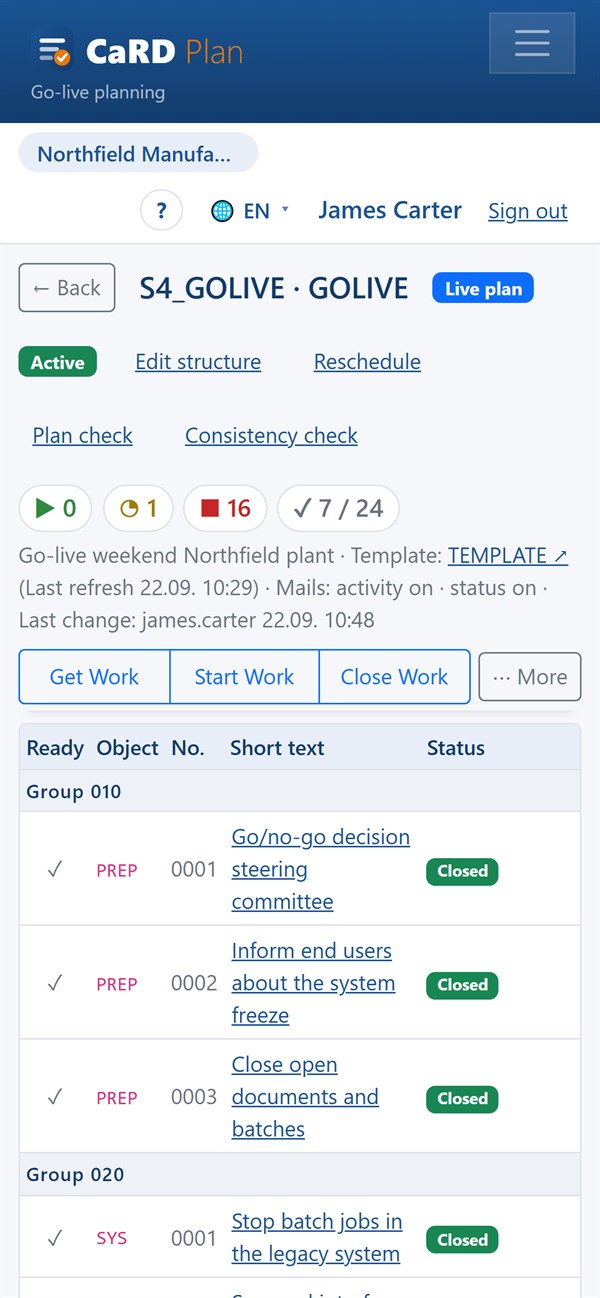
The live board on day X: green = ready to start, red = waiting for predecessors, yellow = in progress. Everyone sees the same state – instantly.
Fewer phone calls, no Excel versions, no “who is doing what right now?”
Whether a changeover weekend, a production ramp-up or an acceptance: CaRD Plan turns the sequence into one plan that everyone works through together – and that is still there next time.
Repeatable instead of reinvented
The activity catalogue becomes a template; every run – test run, dress rehearsal, live run – is its own live plan created from it. Findings flow back into the template as diagnoses. The next release, the next site, the next plant: the same plan, improved.
Live for everyone involved
When somebody closes an item, everyone sees it immediately – no refresh. Completed predecessors release their successors, traffic lights show who can start now. Whoever leads the sequence sees progress, delays and open points in one overview.
Feedback straight from the phone
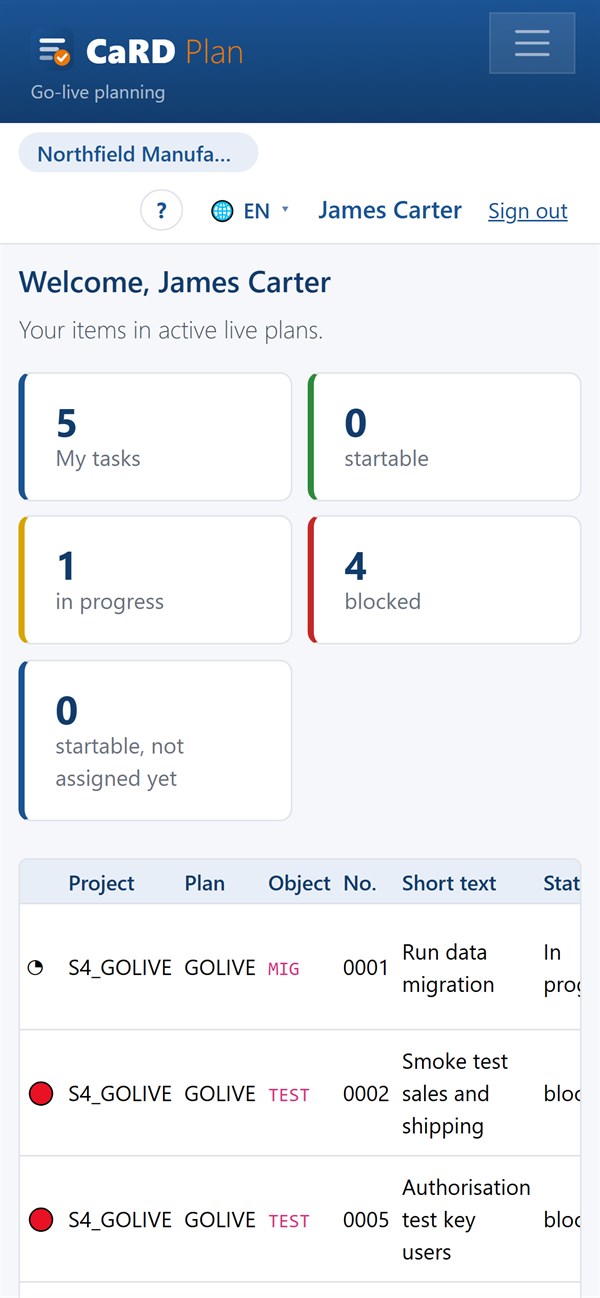
Under “My tasks” executors see only what concerns them and report with one tap: taken, started, done. No call to the control room, no list on paper.
Evidence included
Every action is logged with person and time. Planned and actual duration, delay, forced starts and comments stay in the plan – and end up in the management summary, the closing report (PDF) and the project archive.
Sub plans and several teams
Large migrations consist of partial plans: data migration, infrastructure, business tests. One item in the main plan is a team’s sub plan – with its progress at a glance, nested as deep as you need.
Your data, your operation
Multi-tenant, roles and access grants per user, sign-in with local accounts or Microsoft Entra ID, five languages. Hosted by CaRD in Germany or in your own cloud – with no dependency on third-party services.
Four steps from catalogue to documented live run
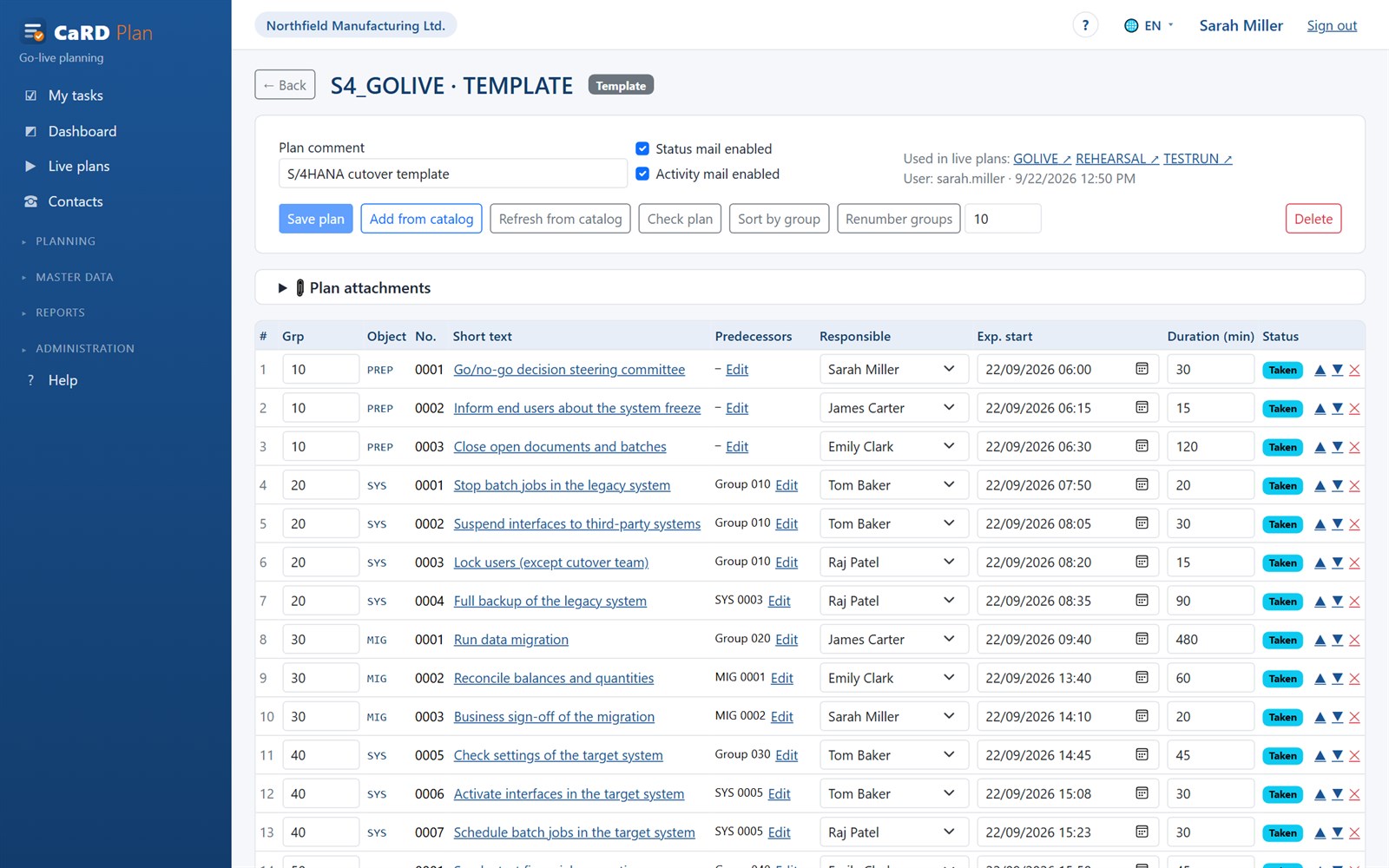
Plan: catalogue and template
Collect the activities of your project with instructions, attachments and planned duration. From these you build the template: groups as sequence blocks, predecessors between items, responsible people and expected times. The plan check finds missing predecessors and cycles before it gets serious.
- Activities with Markdown instructions, files and links
- Groups, predecessors, planned duration, expected end
- Filter on takeover: plan-name rules or classification
Test: test run and dress rehearsal
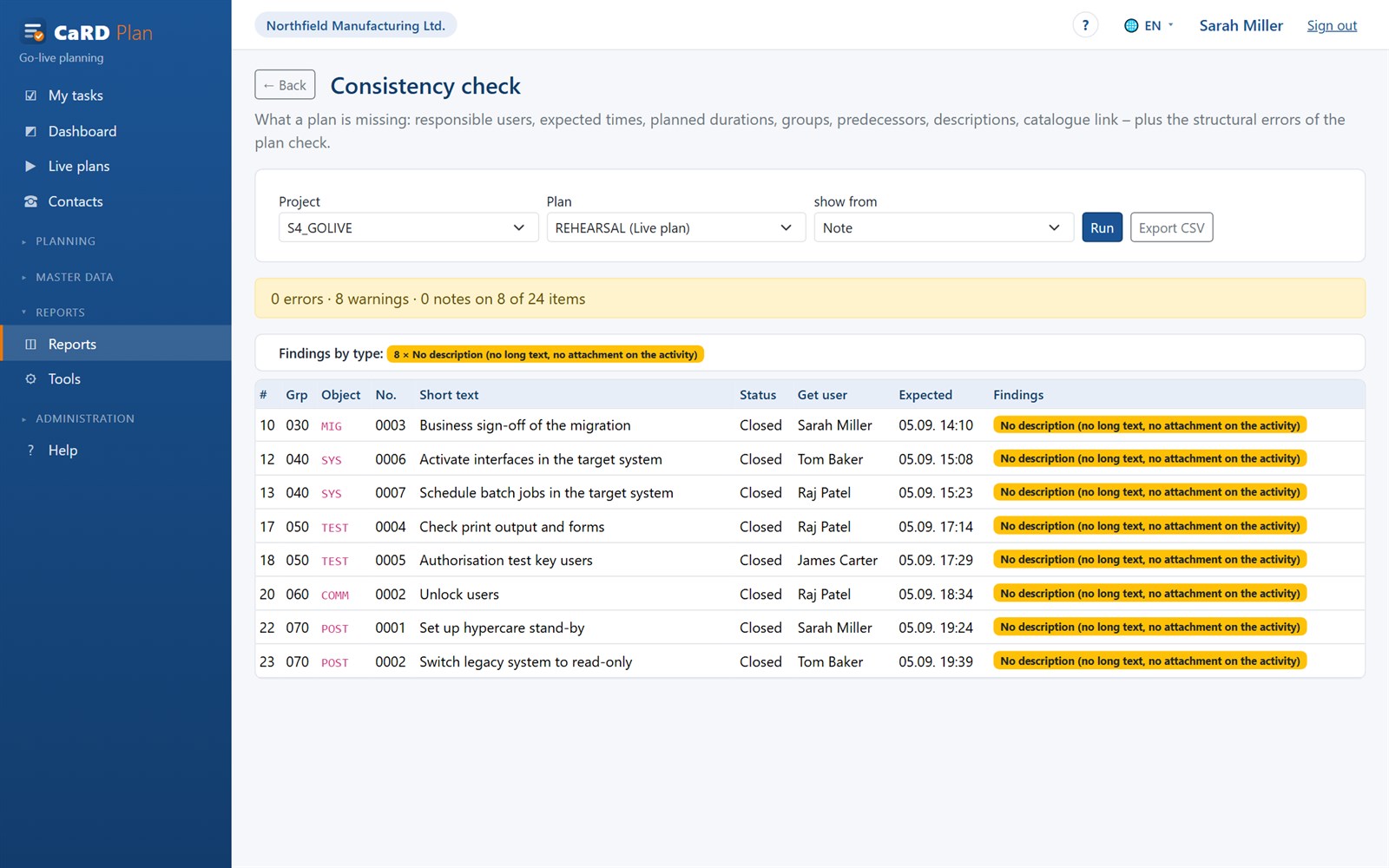
Every rehearsal is its own live plan created from the template. Whatever gets stuck is recorded as a diagnosis on the item: planned too tight, wrong order, missing access. The consistency check shows where responsible people, times or descriptions are still missing – and the template gets better with every run.
- Diagnoses per item as the basis for lessons learned
- Consistency check: errors, warnings, hints, exportable as CSV
- Lead times and experience values per activity
Execute: the live board
On day X everyone works in the same board. Get Work, Start, Close – or Flash for small things and Force when something has to go through despite open predecessors. Sub plans show the progress of their teams, activity and status mails inform the next people in line, the phone list is one click away.
- Traffic lights, counters and filters: startable, blocked, mine, done
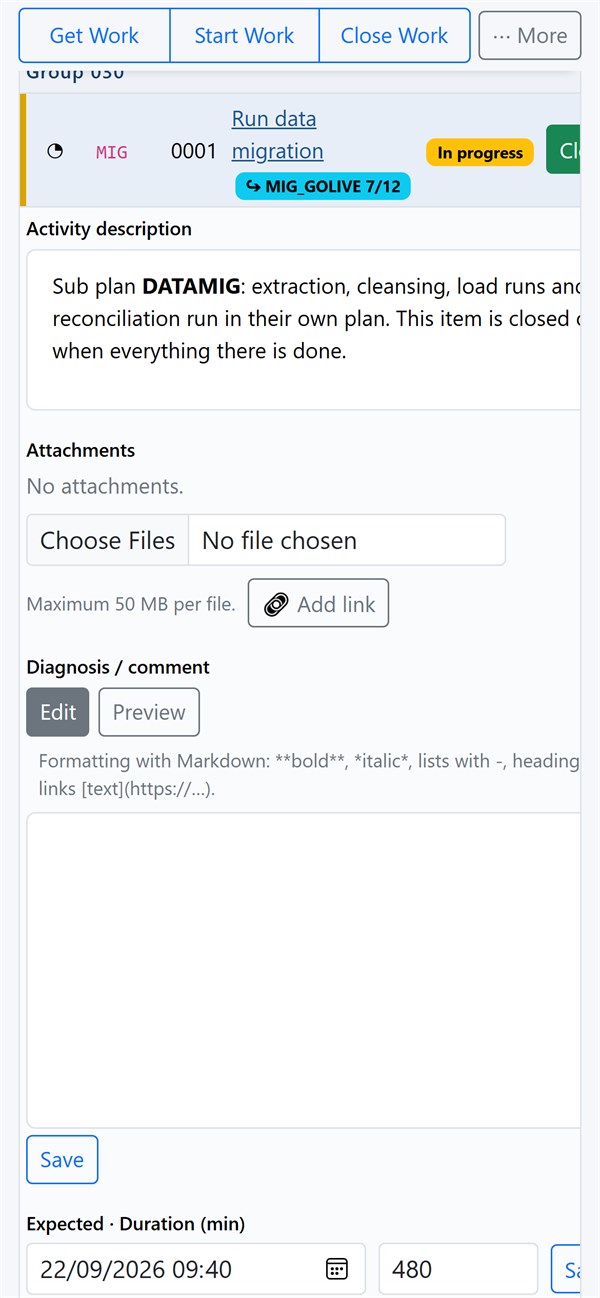
- Details per item: instructions, attachments, diagnosis, predecessors, history
- Changes by others appear immediately – with a note who made them
Oversee and close
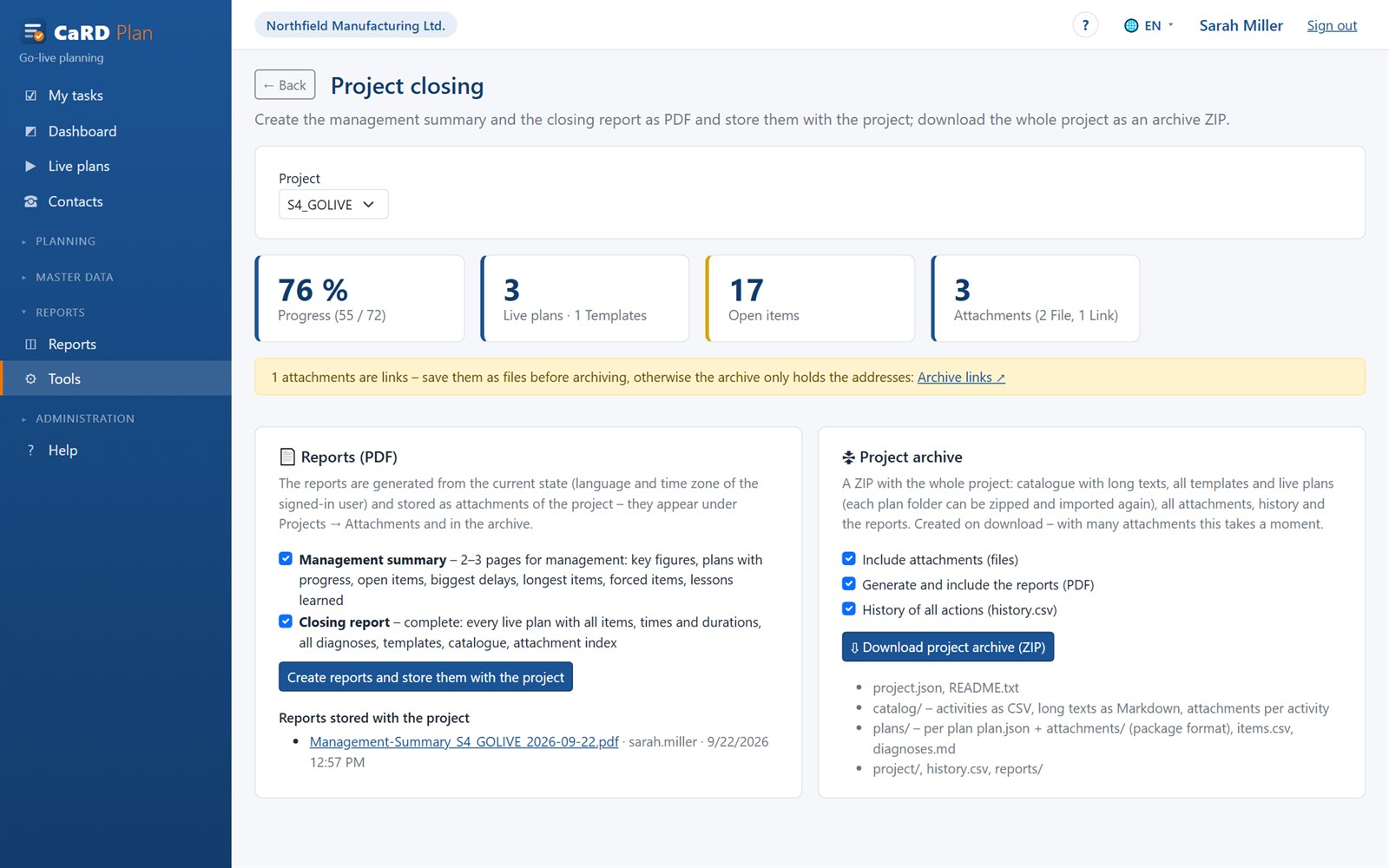
The management overview shows every live plan as a traffic light with progress, delay and critical items. At the end of the project you create the management summary and the closing report as PDFs and download the project archive: catalogue, all plans, attachments, history – ready to be imported again.
- Overview with traffic light, progress bar, remaining effort from experience values
- PDF reports are stored with the project
- Project archive as ZIP, links are archived as files

At the end there is a report, not a pile of e-mails.
The management summary condenses on two or three pages what management wants to know: progress, period, late and forced items, open points, findings. The closing report contains every plan with all items, times, durations and comments. With the function switched on, objects and costs are added: what day X cost and which objects were touched.
Both reports are generated from the current state and stored as attachments of the project – in the user’s language and time zone. The project archive additionally includes the catalogue, attachments and the complete history; every plan folder in it can be imported again later.
See the “Project closing” tool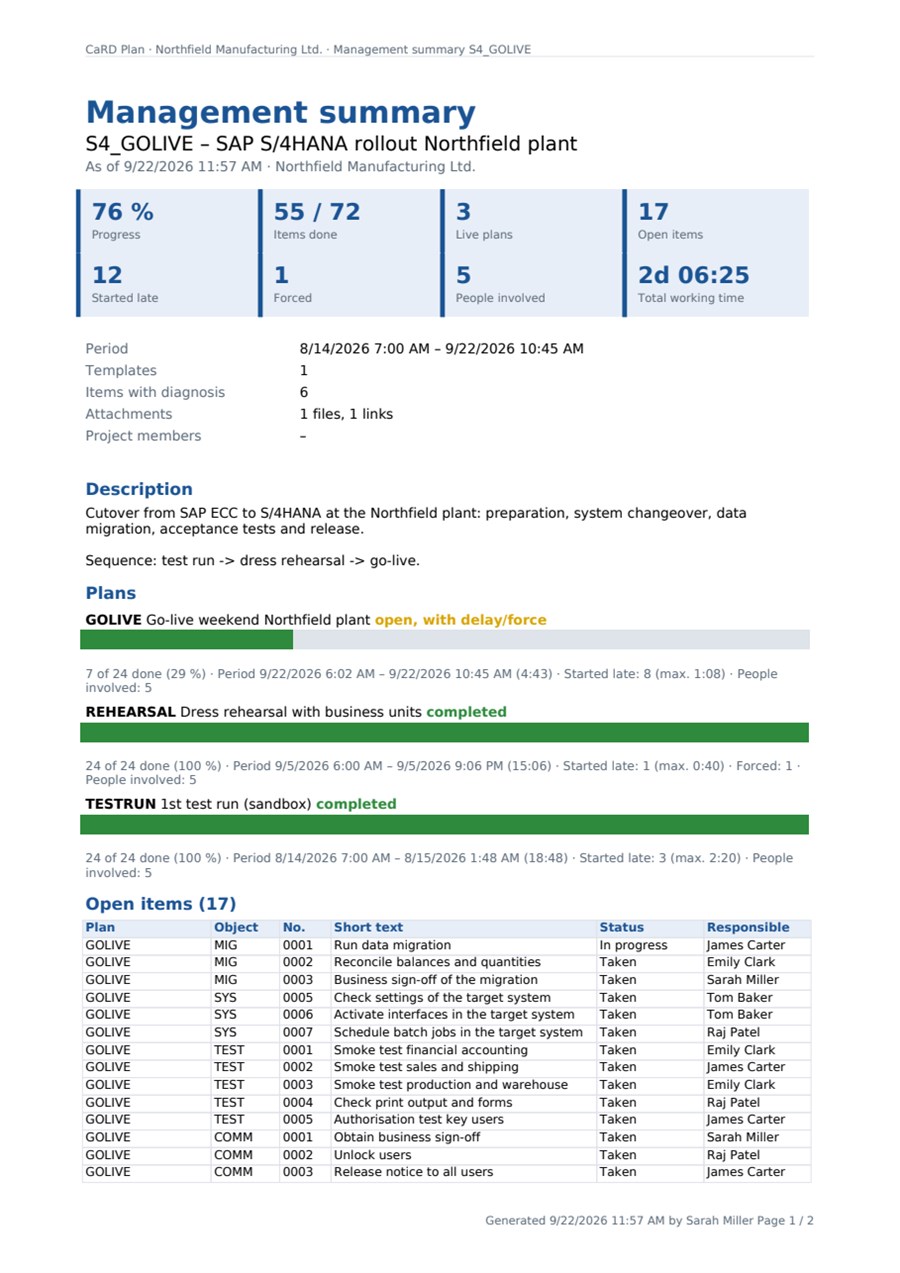
One tool for every procedure that has to be traceable
CaRD Plan grew out of SAP practice and fits every procedure in which many people complete distributed tasks in a fixed order, report back and have to prove it – from management of change through product development to the go-live of an ERP system.
Management of change
Product, plant and process changes – form-fit-function change or new development – planned early, implemented across departments and evidenced step by step. Complements the change process in PLM or ERP.
Learn more →Product development process
Phases and quality gates as a template: engineering, purchasing, quality, production and suppliers work in the same plan, every gate is evidenced – the same proven process for every new product.
Learn more →Acceptance and test plans
Factory acceptance (FAT), site acceptance (SAT), software and user acceptance tests, validation runs: every test step with result, finding and attachment – the protocol writes itself.
Learn more →Cutover for ERP go-lives
SAP S/4HANA, Microsoft Dynamics 365, Oracle JD Edwards or any other system: cutover plan as a template, rehearsals, a live board on the cutover weekend and a closing report.
Learn more →Maintenance plans and shutdowns
Overhauls, plant shutdowns and recurring maintenance of complex products and factories: own teams and contractors in the same plan, every step evidenced with person and time.
Learn more →System replacement and harmonisation
Bringing several sites or companies onto the same solution one after another: the sequence of the first site becomes the template for all the following ones – each time with the findings of the last.
Learn more →Machinery and plant engineering
Commissioning, test and measurement sequences, acceptance at the customer’s site: test steps in a defined order, readings as findings, repetition after a rebuild with the same plan.
Learn more →Medical devices, pharma and laboratory
For FDA-regulated and other regulated manufacturers: the documented sequence – who started and finished which step, and when. A building block of your evidence, not a replacement for your validation.
Learn more →Aviation, energy, transport
Step-by-step evidence for retrofits, product changes and system changeovers: exact order, predecessor conditions, Force only with a reason, complete history in the closing report.
Learn more →Quality management
Sampling, product testing, release and audits following the same procedure every time: steps with owners and dates, findings right on the test step, evidence for every round. Complements LIMS and CAQ.
Learn more →Food and beverage
Product changeovers with allergen cleaning and line release, HACCP checks, recall drills and audit preparation: production, hygiene and quality assurance work in the same plan.
Learn more →Your procedure is not listed?
CaRD Plan fits wherever many people complete and evidence steps in a fixed order. Describe your procedure to us – in 30 minutes we show it to you as a plan.
Request a demo →In short: everything that is done by many hands, reported back directly, rehearsed beforehand, repeated later and has to be proven.
Everyone sees their own tasks – and reports back from wherever they are.
CaRD Plan is a web application: no client, no app-store installation. On the phone it can be added to the home screen and behaves like an app. The interface adapts to phone, tablet and desktop: on the phone the board shows only Get Work, Start and Close and expands the rest on demand; at the desk the full action bar stays visible while scrolling.
At the same time, not one after another
Any number of people work in the same plan. Every status change appears for everyone immediately, together with who made it. Concurrent changes to the same item are detected, not overwritten.
Roles that fit the team
Planners build templates and steer, executors report back, viewers watch, administrators manage. Access grants per project or plan, read or write – also for external service providers.
Notified when it is your turn
Activity mails to the people whose items have just become startable; status mails to subscribers; on request the same messages in a Microsoft Teams channel; a phone list with the numbers of everyone involved in the plan.
Everything a team needs on day X – and nothing that distracts
Planning
- Projects with description, members and attachments
- Activity catalogue per project: object + number, short text, Markdown instructions, classification, planned duration
- Templates with groups, sequence and predecessors (group or single item)
- Default responsible people and expected times
- Takeover preview: include or exclude items by plan-name rules or classification
- Sub plans: template links template, live plan links live plan – translated automatically
- Optional per activity: objects (such as material, change and routing numbers) and estimated planned costs – every task created from it brings them along
- Optionally with AI: plan from Excel, Word or PDF, content review of the plan, translated instructions
Execution
- Live board with traffic lights, counters, filters and search
- Get Work, Start Work, Close Work, Flash, Force, Change, Assign, Reset
- Predecessor logic: successors are released only when all predecessors are done
- Diagnosis per item (Markdown), attachments as file or link
- Expected start, duration, expected end, delay – calculated live
- Reschedule: shift times or take them over from a reference plan
- Enter numbers and actual costs right on the task; closing with missing details only after a confirmation
- Optionally with AI: status report at the push of a button, feedback by photo or voice, search of earlier runs
Collaboration
- Live update for all boards of the same plan
- My tasks: startable, blocked and running items per person
- Activity and status mails, outbox with delivery status
- Messages in a Microsoft Teams channel – optional and outgoing only
- Contacts per person, project and plan; phone list
- Roles planner / executor / viewer / administrator
- Access grants per project or plan, read or write
Reporting and evidence
- Management overview with traffic light, progress, critical items
- Plan check (structure) and consistency check (completeness)
- Item list, lead times, activity calculation (experience values)
- History of every action with person and time
- Management summary and closing report as PDF stored with the project
- Project archive as ZIP; archive links as files
- “Objects and costs” overview: planned, actual and variance per plan and task, all objects touched – also in the closing report
- Optionally with AI: lessons-learned report, suggestions for the template, questions to your data
Tools
- Copy, rename, delete plans; copy projects with catalogue and plans
- Take over or replace responsible people (in one plan or everywhere), load from file
- Export/import of plans as packages – also between installations
- Refresh a template from the catalogue, refresh a live plan from its template
- Data takeover from SAP ZZGLP (tables, long texts, GOS attachments and URLs)
Administration and security
- Multi-tenant: separate data per customer or company – sign-in with a tenant key, one person can work in several tenants
- Sign-in with local accounts or Microsoft Entra ID
- User administration with roles, special functions, copy from template
- Interface and manual in German and English, interface also in French, Spanish and Dutch
- Built-in manual, setup wizard, health check for operations
- No telemetry, no licence call-home – it only talks to what you connect yourself
With your own AI: prepare, execute, evaluate
If you wish, connect your AI service – OpenAI, Claude or Llama in your own data centre – and switch the functions on one by one. Whatever the AI delivers is a draft: you review and decide.
Preparation
- Plan from documents: upload an Excel schedule, Word runbook or PDF – the AI proposes tasks with order, duration and owners
- Content review of the plan: missing backups, approvals or tests, unclear instructions, unrealistic durations
- Translate instructions, turn them into a checklist or make them clearer
- Impact of a change: affected areas and matching activities from the catalogue
Execution
- Status report at the push of a button – optionally to the Teams channel
- Report back by photo or voice: read values, turn a voice note into the comment
- “Did we have this before?” – what helped with the same task in earlier runs
Follow-up
- Lessons-learned report as a draft – a chapter of its own in the closing report
- Suggestions for the template, such as more realistic durations – applied with one click
- Ask your data in your own words
Managed by us – or in your own cloud.
CaRD Plan is a lean .NET application with a PostgreSQL database. It runs wherever your data should live.
Managed by CaRD
We run CaRD Plan for you in Germany: setup, updates, backup, monitoring. You receive your tenant with credentials and get started – ideal for projects with a fixed time window.
Self-hosted
As a package for your Windows server (IIS) or as a container. The setup wizard creates the database and the initial accounts; configuration via a file or environment variables.
Already using the SAP solution ZZGLP “GoLive-Planung”? CaRD Plan takes over projects, catalogues, plans, long texts and attachments with an export report from your SAP system – the keys are preserved.
Short answers
What is CaRD Plan?
CaRD Plan is a web application for planning and running procedures in which many people work in a fixed order – for example the go-live of an ERP system, a production ramp-up or a maintenance shutdown. An activity catalogue becomes templates, templates become live plans for test run, dress rehearsal and live run. Everyone involved works in the same live board at the same time and reports their items back directly – from the phone as well. Every step is logged with person and time.
Who is CaRD Plan for?
For companies that develop, change and accept products – FDA-regulated, in aviation or in any other industry –, for cutover managers and project leads in software and ERP implementations, for the maintenance of complex plants and for quality management with recurring sampling, inspections and audits – for example in the food industry. In short: wherever procedures have to be repeatable, rehearsed and verifiable.
Is CaRD Plan suitable for management of change and product changes?
Yes. Every type of change – for example a form-fit-function change or a new development – becomes a template with assessment, approval, implementation and verification. Every actual change is its own plan from it, and every step is documented with person and time. The change request stays in your PLM or ERP system; CaRD Plan steers and evidences the implementation.
Can I map the product development process and acceptance tests?
Yes. The phases and quality gates of your development process become groups and predecessors of a template. Acceptance and test plans – factory and site acceptance, software and user acceptance tests, validation runs – record every result as a finding on the test step. At the end there is a closing report as PDF.
Which ERP implementations does the cutover planning suit?
Any. CaRD Plan steers the steps of the teams involved and needs no interface to the ERP system – SAP S/4HANA, Microsoft Dynamics 365, Oracle JD Edwards or any other system.
Can CaRD Plan record what a go-live or a change has cost?
Yes – as a function the tenant switches on when needed. Planners store estimated planned costs on the activity in the catalogue or in the template; in the live plan the people responsible enter the actual costs. In the same way the activity defines which objects a task needs, for example two material numbers and one change number; in the live plan only the number is entered. The “Objects and costs” overview shows planned, actual and variance per plan and task plus all objects touched – and so does the closing report.
How is CaRD Plan different from Excel or a project management tool?
Excel lists and classic project plans describe the sequence, but nobody reports back in them live. In CaRD Plan completed predecessors automatically release their successors, traffic lights show everyone what is startable now, and every change appears for everyone immediately. The template is kept for the next project, and the evidence is created as a by-product.
Can executors report their tasks from the phone?
Yes. CaRD Plan is a responsive web application; on the phone executors see only their own items under “My tasks” and report “taken”, “started” or “done” with one tap. The application can be added to the home screen; no app-store installation is needed.
Is there a Microsoft Teams integration?
Yes. The tenant administrator stores the address of a Teams workflow („Post to a channel when a webhook request is received“); from then on CaRD Plan also posts steps that have become startable and activities that have started into that channel – with the person responsible and a button back to the live board. The connection is outgoing only: no app registration and no server reachable from outside are needed, so it also works for an installation inside a company network.
Does CaRD Plan use artificial intelligence?
Optionally: with the AI assistant you connect your own AI service – OpenAI, Claude or Llama in your own data centre – and use it for preparation, execution and follow-up: plan from documents, plan review, status report, feedback by photo or voice, lessons learned. It is off by default; you review whatever the AI delivers before it is applied.
How many people can work in one plan at the same time?
Any number. Status changes are distributed in real time to all open boards of the same plan. Concurrent changes to the same item are detected and not overwritten.
Where does CaRD Plan run?
Either managed by CaRD in Germany or in your own environment: Windows Server with IIS, Linux, Docker, Microsoft Azure, AWS, STACKIT or SAP BTP (Cloud Foundry). A PostgreSQL database is required; at runtime the application only talks to what you connect yourself – your mail server and, if you choose, Microsoft Entra ID or a Microsoft Teams channel. One installation can host any number of tenants side by side: the tenant key is entered when signing in, and every tenant has its own projects, plans, users and settings.
We use the SAP solution ZZGLP “GoLive-Planung”. Can we take over our data?
Yes. An export report for your SAP system delivers projects, activity catalogues, plans, long texts and attachments as a package that CaRD Plan imports. The keys (project, object, number, plan) are preserved.
Which languages does CaRD Plan support?
The interface is available in German, English, French, Spanish and Dutch; the built-in manual in German and English. Every user chooses their own language and time zone; reports are generated in the user’s language.
What does a demo look like and what does CaRD Plan cost?
Tell us briefly which procedure you are planning. In about 30 minutes we show you what the plan looks like in CaRD Plan and, if you wish, set up a trial tenant. Pricing depends on the operating model (managed or self-hosted) and the number of users – get in touch.
See CaRD Plan with your own procedure.
Tell us briefly which procedure you are planning – in 30 minutes we show you what the plan looks like and, if you wish, set up a trial tenant.
CaRD Gesellschaft für EDV-Beratung mbH
Gutenbergring 2 · 69168 Wiesloch, Germany
Phone +49 6222 9256-0 · E-mail info@card.de